
Next JS
End-to-end guide for integrating Wink Identity Web into Next.js 13+ apps, covering both the recommended SDK-based Starter Kit (with internal API routes, profile UI, and OIDC logout) and an alternative NextAuth.js + Keycloak flow. Includes environment setup, secure session creation, user profile retrieval, logout behavior, troubleshooting, and suggestions for screenshots and demo videos.
If you're integrating Wink Login into a Next.js app, you can choose between two approaches:
- Option A (recommended): Use the Wink Identity Web SDK with the official Next.js Starter Kit
- Option B (alternative): Use NextAuth.js with the Keycloak provider (no SDK)
Both options follow the same security model: session-first flow, server-side secrets, and redirect back to your app after biometric authentication.
CRITICAL SECURITY WARNING – READ FIRST
NEVER expose sensitive data in client-side code. This includes:
- ❌
clientSecret– MUST be server-side only (noNEXT_PUBLIC_prefix)- ❌ API keys and credentials – MUST be server-side only
- ❌ Direct API calls to Wink Session / Verify APIs from the browser – MUST go through backend API routes
All sensitive operations (session creation, API calls with credentials) MUST be performed server-side through Next.js API routes.
Option A: Use the Next.js Starter Kit (recommended)
1. Prerequisites
- A Wink merchant account with credentials (client ID, client secret).
- A stable URL you can share with Wink support (production, and optionally a pre-prod URL for testing). For local dev,
http://localhost:3000. - Node 20+, Next.js 14+ recommended.
Staging credentials are fine to start — the integration is identical, only URLs differ.
Assumptions the code examples make
- Next.js App Router (13+). Pages Router users: put the API routes at
pages/api/wink/session.ts/pages/api/wink/user.tswith default handlers instead of namedGETexports. - TypeScript (transcribes to plain JS easily — drop the type annotations).
- React 18+.
@/*TypeScript path alias —create-next-appsets this up by default.- A
/wink-cancelroute to land users who click Cancel inside Wink's auth UI. A static 20-line page saying "Sign-in cancelled — [go back]" is fine.
2. Environment variables
Create .env.local at the project root:
# ─── Client-safe (exposed to browser) ─────────────────────────────────────
NEXT_PUBLIC_WINK_CLIENT_ID=your-merchant-id
NEXT_PUBLIC_WINK_REALM=wink
NEXT_PUBLIC_WINK_BASE_URL=https://stagelogin-api.winkapis.com
NEXT_PUBLIC_WINK_AUTH_URL=https://stageauth.winkapis.com

# ─── Server-only (never exposed to browser) ────────────────────────────────
WINK_IDENTITY_BASE_URL=https://stagelogin-api.winkapis.com
WINK_IDENTITY_CLIENT_ID=your-merchant-id
WINK_IDENTITY_SECRET=<paste the confidential client secret here>
For production, swap stage* → the prod Wink hosts Wink gives you. Add .env.local to .gitignore — never commit WINK_IDENTITY_SECRET.
3. Configure the network boundary
Two pieces here: Wink's side (ask support to whitelist your domains) and your side (a Content Security Policy that lets the SDK reach Wink).
3.1 Ask Wink to whitelist your domains
Send this message to your Wink contact:
Please add the following for our Wink client (client ID: <YOUR-CLIENT-ID>):

  Valid Redirect URIs (add):
    https://<your-production-domain>/*
    http://localhost:3000/*    (for local development)

  Web Origins (add, NO trailing slash):
    https://<your-production-domain>
    http://localhost:3000

Notes:
- Web Origins has no trailing slash (CORS matches the browser's Origin
  header, which never has one).
- The Valid Redirect URIs use the `/*` wildcard so SPA routes match. If
  your app uses only short stable paths, the origin alone is fine.
- These are two distinct Keycloak settings; merchants commonly miss Web
  Origins, which produces CORS errors on /token.
- Alternatively, set Web Origins to `+` to auto-mirror the Valid Redirect
  URIs list.
Turnaround is usually minutes. Don't start coding before the whitelist is applied — you'll get mystifying CORS errors that look like network failures.
3.2 Your app's Content Security Policy
Any regulated-vertical app (healthcare, finance, identity) ships a CSP — and the default ones block the Wink SDK. The SDK makes direct browser-to-Wink fetches for OIDC discovery and token exchange. Your CSP must allow them.
In Next.js, set this in middleware.ts:
// middleware.ts
import { NextResponse } from "next/server";
import type { NextRequest } from "next/server";

export function middleware(req: NextRequest) {
  const res = NextResponse.next();

  const csp = [
    "default-src 'self'",
    "script-src  'self' 'unsafe-inline' 'unsafe-eval' " +
      "https://stageauth.winkapis.com " +
      "https://stagelogin.winkapis.com " +
      "https://ajax.googleapis.com",
    "style-src   'self' 'unsafe-inline'",
    "img-src     'self' data: blob: https:",
    "font-src    'self'",
    // CRITICAL: the SDK fetches these HOSTS from the browser at runtime.
    // Missing entry = "Load failed" on return from Wink (looks like CORS
    // but it's CSP).
    "connect-src 'self' " +
      "https://stageauth.winkapis.com " +
      "https://stagelogin-api.winkapis.com " +
      "https://stagelogin.winkapis.com",
    "frame-src   'self' " +
      "https://stageauth.winkapis.com " +
      "https://stagelogin.winkapis.com",
    "media-src   'self' blob:",
  ].join("; ");

  res.headers.set("Content-Security-Policy", csp);
  return res;
}

export const config = {
  matcher: ["/((?!_next/static|_next/image|favicon.ico|public/).*)"],
};
For production: swap stage*.winkapis.com for the prod equivalents. Keep both in connect-src if you run staging and prod from the same build.
Distinguish the hosts:
| Host | Called by | CSP needed |
|---|---|---|
stageauth.winkapis.com | Browser (OIDC /token, /.well-known, /auth) | Yes — connect-src + frame-src |
stagelogin-api.winkapis.com | Your backend (/wink/v1/session) | Yes if SDK ever hits from browser — safe to include |
stagelogin.winkapis.com | Legacy Wink frame | Keep for compatibility |
4. Install the SDK
npm install [email protected]Pin the version — the SDK is pre-1.0 and can change shape.
5. Pick your integration shape
Two paths, depending on your URL structure:
Path A — stable short URLs (e.g., /, /login, /signin) Your landing/sign-in URL is short and stable, and Wink has it whitelisted exactly (or with /*). Use §6 Standard Integration.
Path B — SPA with dynamic path segments (e.g., /checkin/<jwt>, /u/<id>) Your Sign-in URL includes runtime-varying segments. Wink's exact-match whitelist will reject the full URL after face scan → "Session Expired". Use §6 Standard Integration plus §6.7 Short-Callback Pattern.
If unsure, always do (B). It's strictly more robust.
6. Code — copy-paste ready
6.1 public/silent-check-sso.html
public/silent-check-sso.htmlThe SDK looks for this file by name — ship it empty-ish as a no-op.
<!DOCTYPE html>
<html>
  <body>
    <script>
      parent.postMessage(location.href, location.origin);
    </script>
  </body>
</html>
6.2 app/api/wink/session/route.ts
app/api/wink/session/route.tsCreates a pre-login Wink session. Server-to-Wink call with HTTP Basic auth (not JSON credentials).
import { NextRequest } from "next/server";

const env = (key: string): string => {
  const v = process.env[key];
  if (!v?.trim()) throw new Error(`Missing required env: ${key}`);
  return v.trim();
};

export async function GET(req: NextRequest) {
  const { searchParams } = new URL(req.url);
  const returnUrl = searchParams.get("returnUrl");
  const cancelUrl = searchParams.get("cancelUrl");

  if (!returnUrl || !cancelUrl) {
    return Response.json(
      { error: "returnUrl and cancelUrl query params required" },
      { status: 400 },
    );
  }

  try {
    const baseUrl = env("WINK_IDENTITY_BASE_URL");
    const clientId = env("WINK_IDENTITY_CLIENT_ID");
    const secret = env("WINK_IDENTITY_SECRET");

    // HTTP Basic — NOT a JSON body with ClientId/ClientSecret fields.
    const auth = Buffer.from(`${clientId}:${secret}`).toString("base64");

    const r = await fetch(`${baseUrl}/wink/v1/session`, {
      method: "POST",
      headers: {
        "Content-Type": "application/json",
        Authorization: `Basic ${auth}`,
      },
      body: JSON.stringify({ returnUrl, cancelUrl }),
    });

    if (!r.ok) {
      return Response.json(
        { error: `Wink session API: ${r.status}` },
        { status: r.status },
      );
    }
    return Response.json(await r.json());
  } catch (err) {
    const msg = err instanceof Error ? err.message : "Session request failed.";
    if (msg.startsWith("Missing required env")) {
      return Response.json(
        { error: "Backend not configured. Set WINK_IDENTITY_* env vars." },
        { status: 503 },
      );
    }
    return Response.json({ error: msg }, { status: 500 });
  }
}
Response shape note: Wink returns the session ID with inconsistent casing across responses in practice. The client code below reads through a fallback chain (sessionId → SessionId → id → session_id) to be safe.
6.3 app/api/wink/user/route.ts
app/api/wink/user/route.tsValidates a Wink access token server-side and returns the user profile.
import { NextRequest } from "next/server";

const env = (key: string): string => {
  const v = process.env[key];
  if (!v?.trim()) throw new Error(`Missing required env: ${key}`);
  return v.trim();
};

export async function GET(req: NextRequest) {
  const { searchParams } = new URL(req.url);
  const clientId = searchParams.get("clientId");
  const token = searchParams.get("token");
  if (!clientId || !token) {
    return Response.json(
      { error: "clientId and token required" },
      { status: 400 },
    );
  }

  try {
    const baseUrl = env("WINK_IDENTITY_BASE_URL");
    const secret = env("WINK_IDENTITY_SECRET");

    const r = await fetch(`${baseUrl}/api/ConfidentialClient/verify-client`, {
      method: "POST",
      headers: { "Content-Type": "application/json" },
      body: JSON.stringify({
        ClientId: clientId,
        AccessToken: token,
        ClientSecret: secret,
      }),
    });
    if (!r.ok) {
      return Response.json(
        { error: `Wink verify-client: ${r.status}` },
        { status: r.status },
      );
    }
    return Response.json(await r.json());
  } catch (err) {
    return Response.json(
      { error: err instanceof Error ? err.message : "User request failed" },
      { status: 500 },
    );
  }
}
What's in the response: winkToken (stable user ID within your client ID), winkTag (user-facing stable username, prefixed with ;), firstName, lastName, email, dateOfBirth, etc. Use winkTag as your durable identifier when possible — it's stable across sessions.
6.4 components/WinkAuthProvider.tsx
components/WinkAuthProvider.tsxThe heart of the integration. Every gotcha from §0 handled inline.
"use client";

import {
  createContext,
  useContext,
  useEffect,
  useState,
  useCallback,
} from "react";
import { getWinkLoginClient, WinkError } from "wink-identity-sdk";

interface WinkUserProfile {
  firstName?: string;
  lastName?: string;
  email?: string;
  winkToken?: string;
  winkTag?: string;
  contactNo?: string;
}

interface WinkAuthContextValue {
  isAuthenticated: boolean;
  isLoading: boolean;
  user: WinkUserProfile | null;
  error: string | null;
  signIn: () => Promise<void>;
  signOut: () => Promise<void>;
}

const WinkAuthContext = createContext<WinkAuthContextValue | null>(null);

// ─── config ───────────────────────────────────────────────────────────────
// sessionId is intentionally excluded — pass it to winkLogin({ sessionId })
// right before the user initiates login (Gotcha #10).

function getWinkConfig() {
  return {
    clientId: process.env.NEXT_PUBLIC_WINK_CLIENT_ID ?? "",
    realm: process.env.NEXT_PUBLIC_WINK_REALM ?? "wink",
    loggingEnabled: process.env.NODE_ENV !== "production",
    cancelUrl:
      typeof window !== "undefined"
        ? `${window.location.origin}/wink-cancel`
        : "/wink-cancel",
    onAuthErrorFailure: (e: unknown) => console.error("[wink]", e),
    override: true,
    overrideValues: {
      BASE_URL: process.env.NEXT_PUBLIC_WINK_BASE_URL,
      AUTH_URL: process.env.NEXT_PUBLIC_WINK_AUTH_URL,
    },
  };
}

// These are now SDK defaults in @0.3.0. Passed explicitly here for clarity.
const winkInitBaseOptions = {
  checkLoginIframe: false,
  silentCheckSsoRedirectUri: undefined,
  silentCheckSsoFallback: false,
} as const;

// ─── provider ─────────────────────────────────────────────────────────────

export function WinkAuthProvider({ children }: { children: React.ReactNode }) {
  const [client, setClient] = useState<ReturnType<
    typeof getWinkLoginClient
  > | null>(null);
  const [isAuthenticated, setIsAuthenticated] = useState(false);
  const [isLoading, setIsLoading] = useState(true);
  const [user, setUser] = useState<WinkUserProfile | null>(null);
  const [error, setError] = useState<string | null>(null);

  useEffect(() => {
    // GOTCHA #8: clear this flag on every mount or the SDK may auto-redirect.
    // As of @0.3.0 you can also pass disableAutoRedirect: true to winkInit.
    try {
      window.localStorage.removeItem("login_session_state");
    } catch {}

    const winkClient = getWinkLoginClient(getWinkConfig() as never);
    setClient(winkClient);

    // GOTCHA #9: OAuth code returns in URL hash, not query.
    const hash = window.location.hash;
    const search = window.location.search;
    const haveCode = /[?#&]code=/.test(hash) || /[?#&]code=/.test(search);
    const haveError = /[?#&]error=/.test(hash) || /[?#&]error=/.test(search);

    // `error=login_required` on a fresh load is benign (silent-SSO probe
    // miss, or post-logout signal). Don't surface as error.
    if (haveError && !haveCode) {
      try {
        window.history.replaceState(null, "", window.location.pathname);
      } catch {}
      setIsLoading(false);
      return;
    }

    if (!haveCode) {
      setIsLoading(false);
      return;
    }

    // Return leg — hydrate tokens.
    try {
      winkClient.winkInit({
        ...winkInitBaseOptions,
        // NOTE: `redirectUri` is NOT needed on the return leg — the SDK
        // reads it from the stored kc-callback-<state> entry in localStorage.
        onFailure(e: unknown) {
          console.error("[wink] init onFailure:", e);
          const msg =
            e instanceof WinkError
              ? `${e.message}${e.oidcCode ? ` (${e.oidcCode})` : ""}`
              : (e as { message?: string })?.message ?? "Wink sign-in didn't complete.";
          setIsAuthenticated(false);
          setIsLoading(false);
          setError(msg);
        },
        async onSuccess() {
          // Clear OAuth params so a reload doesn't replay the used code.
          try {
            window.history.replaceState(null, "", window.location.pathname);
          } catch {}
          setIsAuthenticated(true);

          const token =
            (winkClient as { token?: string; idToken?: string }).token ??
            (winkClient as { token?: string; idToken?: string }).idToken;

          if (token) {
            try {
              const url = new URL("/api/wink/user", window.location.origin);
              url.searchParams.set(
                "clientId",
                process.env.NEXT_PUBLIC_WINK_CLIENT_ID ?? "",
              );
              url.searchParams.set("token", token);
              const res = await fetch(url);
              if (res.ok) setUser(await res.json());
            } catch (e) {
              console.error("user fetch:", e);
            }
          }
          setIsLoading(false);
        },
      });
    } catch (e) {
      console.error("[wink] init threw:", e);
      setError("Wink initialization failed.");
      setIsLoading(false);
    }
  }, []);

  const signIn = useCallback(async () => {
    if (!client) return;
    setError(null);

    try {
      // GOTCHA #8: redirectUri must match Wink's whitelist. `${origin}/` is
      // the safest short URL to rely on. If your sign-in page lives at a
      // dynamic path (see §6.7), stash context in sessionStorage first.
      const returnUrl = `${window.location.origin}/`;
      const cancelUrl = `${window.location.origin}/wink-cancel`;

      const sessionUrl = new URL("/api/wink/session", window.location.origin);
      sessionUrl.searchParams.set("returnUrl", returnUrl);
      sessionUrl.searchParams.set("cancelUrl", cancelUrl);

      const r = await fetch(sessionUrl);
      if (!r.ok) {
        const data = await r.json().catch(() => ({}));
        throw new Error(data.error || `Session API: ${r.status}`);
      }
      const s = await r.json();
      const sessionId = s.sessionId ?? s.SessionId ?? s.id ?? s.session_id;
      if (!sessionId) throw new Error("Backend session has no sessionId.");

      // Reuse the existing client singleton — pass the fresh sessionId directly
      // to winkLogin(). Do NOT recreate the client here (Gotcha #10).
      client.winkLogin({
        sessionId: String(sessionId),
        redirectUri: returnUrl,
        onFailure(e: unknown) {
          console.error("[wink] signIn onFailure:", e);
          const msg =
            e instanceof WinkError
              ? `${e.message}${e.oidcCode ? ` (${e.oidcCode})` : ""}`
              : (e as { message?: string })?.message || "Wink login failed to start.";
          setError(`Wink sign-in failed: ${msg}`);
        },
      });
    } catch (e) {
      setError(e instanceof Error ? e.message : String(e));
    }
  }, [client]);

  const signOut = useCallback(async () => {
    if (!client) return;
    setIsAuthenticated(false);
    setUser(null);

    // GOTCHA #11: winkLogout crashes if winkInit never ran.
    // As of @0.3.0, winkLogout() also properly terminates the Wink
    // realm-level session — users must re-authenticate after sign-out.
    const c = client as unknown as {
      authenticated?: boolean;
      winkLogout?: (p?: {
        redirectUri?: string;
        onFailure?: (e: unknown) => void;
      }) => Promise<void>;
    };
    if (c.authenticated && c.winkLogout) {
      try {
        await c.winkLogout({
          redirectUri: window.location.origin,
          onFailure: (e) => console.error("[wink] logout failed:", e),
        });
        return;
      } catch (e) {
        console.error("[wink] logout failed, falling back:", e);
      }
    }
    window.location.assign(window.location.origin);
  }, [client]);

  return (
    <WinkAuthContext.Provider
      value={{ isAuthenticated, isLoading, user, error, signIn, signOut }}
    >
      {children}
    </WinkAuthContext.Provider>
  );
}

export function useWinkAuth(): WinkAuthContextValue {
  const ctx = useContext(WinkAuthContext);
  if (!ctx)
    throw new Error("useWinkAuth must be called inside WinkAuthProvider");
  return ctx;
}
6.5 Wire the provider into your app
// app/layout.tsx
import { WinkAuthProvider } from "@/components/WinkAuthProvider";

export default function RootLayout({
  children,
}: {
  children: React.ReactNode;
}) {
  return (
    <html lang="en">
      <body>
        <WinkAuthProvider>{children}</WinkAuthProvider>
      </body>
    </html>
  );
}
6.6 Use it on a page
// app/page.tsx
"use client";
import { useWinkAuth } from "@/components/WinkAuthProvider";

export default function Page() {
  const { isAuthenticated, isLoading, user, error, signIn, signOut } =
    useWinkAuth();

  if (isLoading) return <div>Loading…</div>;
  if (!isAuthenticated) {
    return (
      <div>
        <h1>Welcome</h1>
        {error && <p style={{ color: "red" }}>{error}</p>}
        <button onClick={signIn}>Sign in with Wink</button>
      </div>
    );
  }
  return (
    <div>
      <h1>Hi, {user?.firstName ?? "there"}</h1>
      <p>{user?.email}</p>
      <button onClick={signOut}>Sign out</button>
    </div>
  );
}
6.7 Short-Callback Pattern (for SPAs with dynamic routes)
When you need this: your sign-in page lives at a URL with dynamic segments — e.g., /checkin/<intake-token>, /u/<user-id>, /org/<slug>/login — and Wink's whitelist is exact-match (not /*). Using the current URL as redirectUri will fail Wink's validation after face scan ("Session Expired").
The pattern:
- Before redirecting to Wink, stash your per-request context (intake token, user ID, whatever you need on return) in
sessionStorage. - Use a short fixed URL (typically
${origin}/) asredirectUri. - Make your root
/page client-side. On load, detect the OAuth code in the URL hash. If present, render a callback component that exchanges the code, reads the stashed context, runs your app-specific verification, then navigates to the real destination. - If no code, redirect to wherever staff/anonymous users normally go.
Example shape (abbreviated):
// In signIn() — before redirecting to Wink:
window.sessionStorage.setItem("wink:pendingIntakeToken", intakeToken);
const returnUrl = `${window.location.origin}/`;

// app/page.tsx — root is client-side
("use client");
export default function Home() {
  const [mode, setMode] = useState<"callback" | "normal" | null>(null);

  useEffect(() => {
    const hash = window.location.hash;
    const haveCode = /[?#&]code=/.test(hash);
    const pending = window.sessionStorage.getItem("wink:pendingIntakeToken");
    setMode(haveCode && pending ? "callback" : "normal");
  }, []);

  if (mode === "callback") return <WinkCallbackClient />;
  if (mode === "normal") return <RegularLandingRouter />; // redirect to /login or /queue
  return <Spinner />;
}

// app/_wink-callback/WinkCallbackClient.tsx — exchanges the code and hands off
("use client");
export default function WinkCallbackClient() {
  useEffect(() => {
    const intakeToken = sessionStorage.getItem("wink:pendingIntakeToken")!;
    const client = getWinkLoginClient(getWinkConfig() as never);

    client.winkInit({
      checkLoginIframe: false,
      silentCheckSsoRedirectUri: undefined,
      silentCheckSsoFallback: false,
      // Optional: match the sign-in leg's redirectUri, though the SDK
      // reads the stored value from kc-callback-<state> regardless.
      redirectUri: `${window.location.origin}/`,
      async onSuccess() {
        window.history.replaceState(null, "", "/");
        const token = (client as any).token ?? (client as any).idToken;
        await fetch(`/api/intake/${intakeToken}/wink-verify`, {
          method: "POST",
          headers: { "Content-Type": "application/json" },
          body: JSON.stringify({ winkAccessToken: token }),
        });
        sessionStorage.removeItem("wink:pendingIntakeToken");
        window.location.replace(`/checkin/${intakeToken}`);
      },
      onFailure(e) {
        /* show error, navigate back to fallback */
      },
    });
  }, []);
  return <div>Completing sign-in with Wink…</div>;
}
Server-side wrinkle: if your root / is a server component with redirect(), that redirect happens before any client code runs, so the fragment #code=… rides along to the destination. Either keep root client-side (as above) or add fragment-detection to whatever page it redirects to.
7. Detailed gotchas (the "why" for each)
Gotcha 1: Web Origins ≠ Valid Redirect URIs
Wink (Keycloak) has two independent allowlists. Valid Redirect URIs controls which URLs Wink will redirect to post-login. Web Origins controls the Access-Control-Allow-Origin header on /token, /userinfo, etc. Missing Web Origins → CORS failure that Safari reports as generic "Load failed".
Gotcha 2: No trailing slash on Web Origins
CORS matching compares exactly against the browser's Origin header, which is always scheme://host[:port] with no path. So https://acme.com/ in Web Origins will not match https://acme.com. When asking Wink to whitelist, always write Web Origins without trailing slash.
Gotcha 3: Exact-match Redirect URIs trap SPAs
Keycloak's default redirect-uri-match-mode is exact match, not prefix. Without a /* wildcard, https://app.com in your whitelist does not match https://app.com/anything/else. For SPAs with dynamic paths, either:
- Ask Wink to set Valid Redirect URIs to
https://app.com/*(wildcard), or - Use the Short-Callback Pattern (§6.7) so you always redirect to a short stable URL.
Symptom when mismatched: face scan succeeds, then Wink's UI shows "Session Expired" and never redirects back. (The /auth endpoint accepts the mismatched URI leniently, but the post-scan validation is stricter.)
Gotcha 4: CSP connect-src blocks the SDK
connect-src blocks the SDKIf your app has a Content Security Policy (required by HIPAA, SOC2, PCI), the browser enforces it independently of CORS. The Wink SDK makes direct browser fetches to:
https://stageauth.winkapis.com/realms/{realm}/.well-known/openid-configurationhttps://stageauth.winkapis.com/realms/{realm}/protocol/openid-connect/token
Any of these blocked by your CSP → Error: Load failed from the SDK. It's indistinguishable from a CORS error at a glance but is entirely in your control.
Fix: the CSP snippet in §3.2.
Gotcha 5: iframe checks disabled by default in @0.3.0
As of [email protected], checkLoginIframe and silentCheckSsoFallback are disabled by default and silentCheckSsoRedirectUri is unset by default. No workaround is needed on this version.
If you are still on @0.2.5, you must pass these options to every winkInit call to avoid a 10-second timeout ("Error: Timeout when waiting for 3rd party check iframe message"):
checkLoginIframe: false,
silentCheckSsoRedirectUri: undefined,
silentCheckSsoFallback: false,
The §6.4 code above passes them explicitly for documentation clarity — they are harmless to pass on @0.3.0.
Gotcha 6: redirect_uri defaults to window.location.href
redirect_uri defaults to window.location.hrefIf you don't pass redirectUri in winkLogin options, the SDK uses the current page's full URL (including any dynamic path segments) as the OAuth redirect_uri. Combined with exact-match whitelisting (Gotcha 3), this fails for any SPA whose sign-in page has a dynamic route.
Fix: always pass redirectUri explicitly on the sign-in leg:
redirectUri: `${window.location.origin}/<whitelisted-path>`;For most apps, ${window.location.origin}/ (origin + /) is the simplest.
Gotcha 7: Silent-SSO iframe on iPhone Safari
Even once the 3p-cookies check is disabled (Gotcha 5), there's a separate silent-SSO iframe the SDK fires on winkInit. On iPhone Safari, its #error=login_required response can bubble up to the top window, clobbering a real #code=… before token exchange runs. checkLoginIframe: false disables this.
Gotcha 8: login_session_state auto-redirect
login_session_state auto-redirectThe SDK reads localStorage.login_session_state. If set to "1", it auto-redirects to Wink whenever silent SSO can't hydrate. Clear the flag on every page mount before calling winkInit:
try {
  window.localStorage.removeItem("login_session_state");
} catch {}
As of @0.3.0, you can alternatively pass disableAutoRedirect: true to winkInit to opt out via the SDK API instead of manually clearing the flag.
Gotcha 9: OAuth code returns in URL hash
code returns in URL hashWink uses response_mode=fragment. The browser URL after sign-in looks like https://yourapp.com/#state=…&code=…&session_state=…. The fragment never reaches the server, so server logs show only GET /. Detect client-side via window.location.hash.
Server-redirect wrinkle: Next.js App Router pages that call redirect() server-side will carry the fragment to the destination (#code=… survives). Either keep the landing page client-side or detect the fragment on whichever page the user ultimately lands on.
Gotcha 10: sessionId placement
sessionId placementObtain a sessionId from your backend right before the user initiates login and pass it to client.winkLogin({ sessionId }). Reuse the existing client singleton — do not recreate the client with sessionId in the config.
Why this matters: a session fetched at page load may expire if the user waits before clicking "Sign in". Fetching fresh and passing to winkLogin() ensures the session is always valid at the moment of redirect.
Gotcha 11: winkLogout() preconditions
winkLogout() preconditionswinkLogout() relies on internal SDK state that only exists after a successful winkInit. If your code path ever reaches sign-out without that — sign-out visible during a failed auth flow, an error path that skipped init, or a session backed by a different auth method — calling winkLogout() throws undefined is not an object (evaluating 'this.#t.logout').
Fix: check client.authenticated (inherited boolean) before calling:
if (client.authenticated && client.winkLogout) {
  await client.winkLogout({ redirectUri: window.location.origin });
} else {
  // local cleanup + hard navigation
  window.location.assign(window.location.origin);
}
Gotcha 12: Wink session termination on logout
As of [email protected], winkLogout() now properly terminates the Wink realm-level session. After sign-out, the next login attempt will require biometric re-authentication — silent SSO will not silently re-authenticate the user.
If you are on @0.2.5, winkLogout() terminated your app's OIDC session but did not kill Wink's realm-level session cookie. Any OIDC client signing the user in again would silently re-authenticate with no selfie or MFA. Upgrade to @0.3.0 to get the correct behavior.
Gotcha 13: SSR hydration mismatch
Next.js renders pages server-side first, then hydrates on the client. Reading window.location.search / .hash during render → empty strings on SSR, real values on client → React panics and discards the tree.
Fix: never read browser globals during render; stash them in state from a useEffect:
const [hash, setHash] = useState("");
useEffect(() => {
  setHash(window.location.hash);
}, []);
8. Debugging
"Load failed" in onFailure
"Load failed" in onFailureThe SDK reports four distinct failures as Error("Load failed") with no additional metadata:
- CSP
connect-srcviolation — your app's CSP blocks the fetch. Check browser DevTools → Console for a "Refused to connect tohttps://stageauth.winkapis.com…" message. - CORS failure — Wink's Web Origins misconfigured. Check Network tab for the
/tokenPOST → response should includeAccess-Control-Allow-Origin: https://your-domain. If missing or wrong, Wink-side fix. sessionIdpassed incorrectly — Gotcha 10. EnsuresessionIdis passed towinkLogin({ sessionId }), not to the client constructor.- Network/TLS error — rare; reproducible with offline mode.
As of @0.3.0, errors from onFailure callbacks are instances of WinkError with an oidcCode and oidcDescription field, which gives you more detail than the generic "Load failed" message.
How to tell them apart: Open DevTools → Console. CSP violations show as "Refused to connect…" with the exact blocked URL. CORS shows as "blocked by CORS policy" (Chrome) or generic "Load failed" (Safari — always debug in Chrome first).
"Timeout when waiting for 3rd party check iframe message"
"Timeout when waiting for 3rd party check iframe message"You are on @0.2.5. Upgrade to @0.3.0 where these checks are disabled by default, or add silentCheckSsoRedirectUri: undefined + silentCheckSsoFallback: false to every winkInit call.
"Session Expired" on Wink's own UI after face scan
"Session Expired" on Wink's own UI after face scanredirect_uri doesn't match Wink's whitelist. Gotcha 3 + 6. Either:
- Ask Wink for a
/*wildcard on Valid Redirect URIs, or - Explicitly pass a whitelisted short URL as
redirectUriinwinkLogin(Short-Callback Pattern, §6.7).
error=login_required in URL hash on fresh loads
error=login_required in URL hash on fresh loadsUsually harmless — the silent-SSO probe saying "user isn't authenticated with Wink; do an interactive login." Don't treat as an error. Only alarm on actual OAuth errors like access_denied or invalid_grant.
Infinite redirect loop between your app and Wink
Almost always login_session_state === "1" in localStorage. Gotcha 8. Make sure your mount code clears it every time, or pass disableAutoRedirect: true to winkInit (@0.3.0+).
Token exchange succeeds but getUser() returns nothing
getUser() returns nothingCheck /api/wink/user response. If 4xx, the client ID + access token combo isn't validating at Wink's backend. Common cause: wrong WINK_IDENTITY_SECRET on server.
this.#t.logout undefined
this.#t.logout undefinedwinkLogout() called before a successful winkInit. Gotcha 11. Branch on client.authenticated first.
9. Testing checklist
Before shipping:
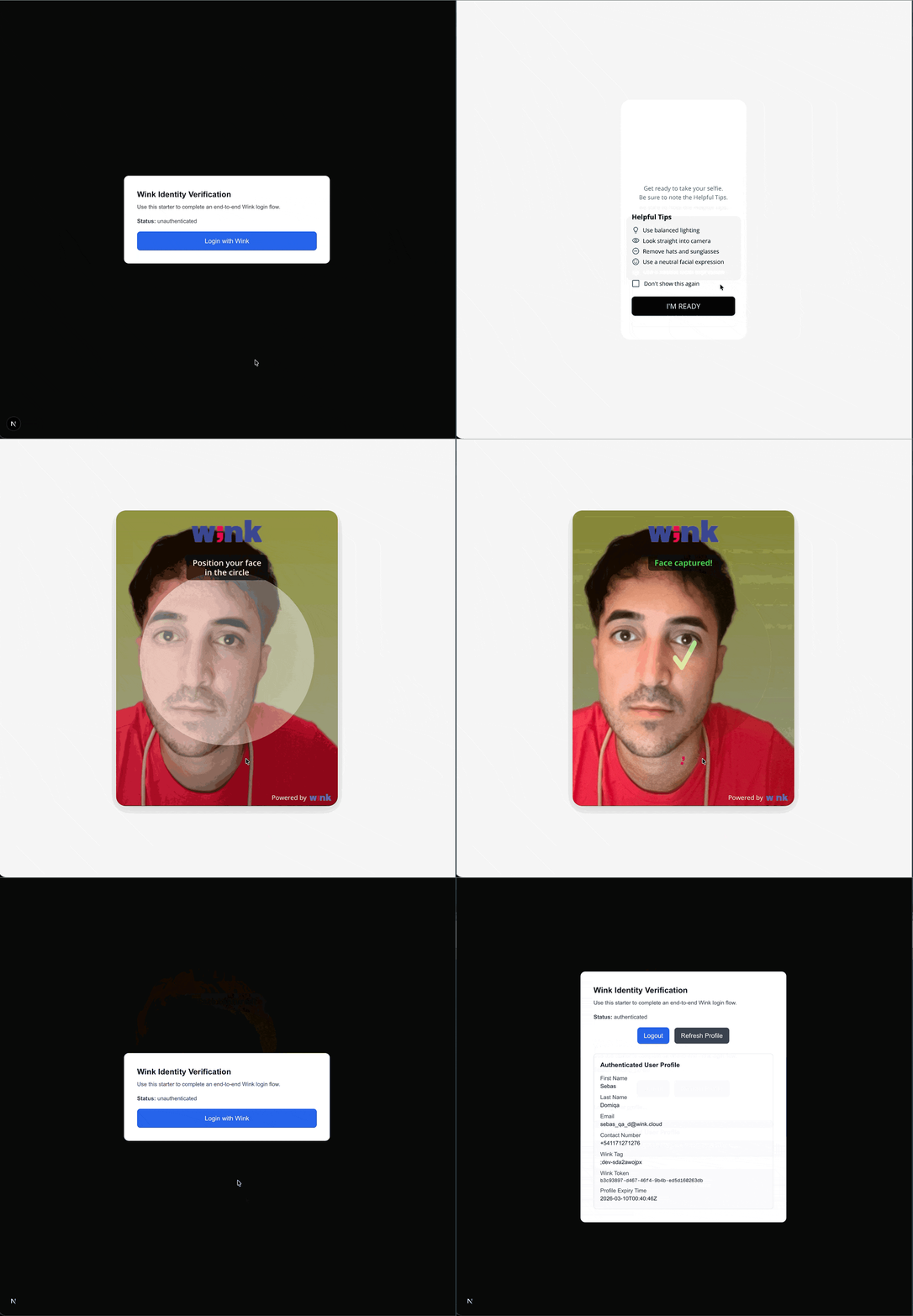
- Fresh incognito Chrome desktop → Sign in → selfie → returns with profile
- Same → Sign out → URL resets, user null
- Immediate re-sign-in → requires biometric (Wink realm-level session terminated, @0.3.0)
- DevTools Network:
/tokenPOST returns 200, CORS headers present, no CSP violations in Console - Browser refresh during authenticated session → user stays authenticated
- iPhone Safari → full flow (catches iframe + 3p-cookies gotchas)
- Desktop browser with no prior Wink session → full MFA flow (catches the palm-only MFA deadlock below)
- Sign in from a URL with dynamic segments (if your app has them) → verify the short-callback pattern returns to the right page
Desktop MFA deadlock
Wink lets users register palm as their sole MFA factor via the WinkID mobile app. Palm scan isn't supported on desktop browsers — the camera capture doesn't work for it. Users hit a dead end at MFA on desktop.
Tell your users (in your own docs / onboarding): "If you want to sign in from a desktop browser, register voice or TOTP as an MFA factor in the WinkID mobile app first." Not a bug you can fix in your integration.
10. Reference: file tree
After integration your Next.js app should have these Wink-specific files:
app/
  api/
    wink/
      session/route.ts             # ~50 lines (§6.2)
      user/route.ts                # ~40 lines (§6.3)
  _wink-callback/                  # short-callback pattern (§6.7, optional)
    WinkCallbackClient.tsx
  page.tsx                         # root, handles callback fragment
  wink-cancel/page.tsx             # cancel landing
  layout.tsx                       # wrap in <WinkAuthProvider>
components/
  WinkAuthProvider.tsx             # ~200 lines (§6.4)
public/
  silent-check-sso.html            # 7 lines (§6.1)
middleware.ts                      # CSP (§3.2)
.env.local                         # 9 vars (§2)
11. When things still don't work
| Symptom | First thing to check |
|---|---|
Error: Load failed | CSP connect-src (§3.2), then Web Origins at Wink |
Error: Timeout when waiting for 3rd party check iframe message | Upgrade to @0.3.0; or add silentCheckSsoRedirectUri: undefined + silentCheckSsoFallback: false in every winkInit |
| "Session Expired" on Wink UI after face scan | redirectUri mismatch vs whitelist (Gotcha 3 + 6); either /* wildcard or short-callback pattern |
| Redirect loop | login_session_state === "1" not cleared; or pass disableAutoRedirect: true to winkInit |
this.#t.logout undefined | winkLogout() before winkInit completed |
| iPhone Safari-only bugs | checkLoginIframe: false + 3p-cookies override; reproduce in Chrome first |
/token exchange silently fails (generic "Load failed") | sessionId not passed to winkLogin({ sessionId }) — check Gotcha 10 |
| Token exchange works but profile is empty | Wrong WINK_IDENTITY_SECRET |
If none of these match, check the SDK version. Pin to [email protected].
12. Version compatibility matrix
| SDK version | Tested | Known quirks |
|---|---|---|
0.3.0 | ✓ | Recommended. iframe checks off by default. winkLogout() properly terminates realm session. winkLogin({ sessionId }) API. WinkError with oidcCode/oidcDescription. disableAutoRedirect option. |
0.2.5 | ✓ | All 13 original gotchas apply. Requires explicit silentCheckSsoRedirectUri: undefined + silentCheckSsoFallback: false. winkLogout() does not terminate realm-level session. |
< 0.2.5 | ✗ | Not recommended. API shape differs. |
License
This guide captures learnings from two real integrations (consumer passkey app + HIPAA-compliant patient intake). Free to reuse across projects — no attribution required.
Option B: Use NextAuth.js (no SDK)
If your team prefers to centralize auth with NextAuth, you can integrate Wink Login using the Keycloak provider. In this setup:
- NextAuth acts as the OAuth client.
- You do not use the Wink Identity Web SDK.
- The Wink session is still created server-side via an API route before redirecting the user to Keycloak/Wink.
Note: This approach does NOT require the Wink Identity Web SDK. NextAuth handles OAuth flows, token management, and session handling.
Prerequisites
- Next.js 13+ (App Router)
- Node.js 18+
- Backend API route for session creation (see Backend Integration)
Quick Start
Starter Kit Variant: If you ship a NextAuth-based variant, link it here as an alternative. Otherwise, treat these steps as a manual recipe.
Installation
npm install next-auth@^4.24.11 axios
# or
yarn add next-auth@^4.24.11 axios
# or
pnpm add next-auth@^4.24.11 axios
Environment Variables
# Wink Identity Configuration (Client-safe – can be exposed to browser)
NEXT_PUBLIC_WINK_LOGIN_AUTH_URL=https://auth.winklogin.com/
NEXT_PUBLIC_WINK_LOGIN_CLIENT_ID=your-client-id
NEXT_PUBLIC_WINK_LOGIN_REALM=your-realm

# Server-side only (NEVER exposed to browser – used in API routes)
WINK_SESSION_API_URL=https://api.winklogin.com/wink/v1/session
KEYCLOAK_CLIENT_ID=your-client-id
KEYCLOAK_CLIENT_SECRET=your-client-secret
NEXTAUTH_SECRET=your-nextauth-secret-here
NEXTAUTH_URL=http://localhost:3000
1: Create Session API Route
Create a Next.js API route that calls the Wink Session API. This route handles all sensitive operations server-side:
// app/api/wink/session/route.ts
import axios from 'axios';
import { NextRequest } from 'next/server';

export async function POST(req: NextRequest) {
  try {
    const { returnUrl, cancelUrl } = (await req.json()) as {
      returnUrl?: string;
      cancelUrl?: string;
    };

    if (!returnUrl || !cancelUrl) {
      return new Response(
        JSON.stringify({ error: 'Missing returnUrl or cancelUrl' }),
        { status: 400 }
      );
    }

    // ✅ These environment variables are server-side only (no NEXT_PUBLIC_ prefix)
    // They are NEVER exposed to the browser
    const baseUrl = process.env.WINK_SESSION_API_URL;
    const clientId = process.env.KEYCLOAK_CLIENT_ID;
    const clientSecret = process.env.KEYCLOAK_CLIENT_SECRET;

    if (!baseUrl || !clientId || !clientSecret) {
      return new Response(
        JSON.stringify({ error: 'Session service is not configured' }),
        { status: 500 }
      );
    }

    // Create Basic Auth credentials
    const credentials = Buffer.from(`${clientId}:${clientSecret}`).toString('base64');

    const response = await axios.post(
      baseUrl,
      { returnUrl, cancelUrl },
      {
        headers: {
          'Content-Type': 'application/json',
          Authorization: `Basic ${credentials}`,
        },
      }
    );

    return Response.json(response.data);
  } catch {
    // Do not leak internals; return generic error
    return new Response(JSON.stringify({ error: 'Failed to create session' }), {
      status: 500,
    });
  }
}
See: Backend Integration for details on the Wink Session API endpoint.
2: Create Session Service
Create a service to handle session creation:
// services/winkSessionService.ts
import axios from 'axios';

export interface WinkSessionResponse {
  sessionId: string;
}

export class WinkSessionService {
  private static instance: WinkSessionService;
  private baseUrl: string;
  private clientId: string;

  private constructor() {
    this.baseUrl = '/api/wink/session';
    this.clientId = process.env.NEXT_PUBLIC_WINK_LOGIN_CLIENT_ID || '';
  }

  public static getInstance(): WinkSessionService {
    if (!WinkSessionService.instance) {
      WinkSessionService.instance = new WinkSessionService();
    }
    return WinkSessionService.instance;
  }

  public async createSession(
    returnUrl: string,
    cancelUrl: string
  ): Promise<WinkSessionResponse> {
    if (!this.baseUrl || !this.clientId) {
      throw new Error('Wink session configuration is incomplete');
    }

    try {
      const response = await axios.post<WinkSessionResponse>(
        '/api/wink/session',
        { returnUrl, cancelUrl }
      );
      return response.data;
    } catch (error) {
      if (axios.isAxiosError(error)) {
        const errorMessage = error.response?.data?.message || error.message;
        throw new Error(`Failed to create Wink session: ${errorMessage}`);
      }
      throw new Error('Failed to create Wink session: Unknown error');
    }
  }

  public isConfigured(): boolean {
    return !!(this.clientId);
  }
}

export const winkSessionService = WinkSessionService.getInstance();
3: Create Type Definitions
// types/auth.ts
import { Session } from 'next-auth';

export interface IToken {
  accessToken?: string;
  idToken?: string;
  refreshToken?: string;
  accessTokenExpires?: number;
  user?: any;
  error?: string;
}

export type ExtendedSession = Session & Partial<IToken>;
4: Create Configuration File
// config/index.ts
type Configuration = {
  winkLoginAuthURL: string | undefined;
  winkLoginClientId: string | undefined;
  winkLoginRealm: string | undefined;
};

export const configuration: Configuration = {
  winkLoginAuthURL: process.env.NEXT_PUBLIC_WINK_LOGIN_AUTH_URL,
  winkLoginClientId: process.env.NEXT_PUBLIC_WINK_LOGIN_CLIENT_ID,
  winkLoginRealm: process.env.NEXT_PUBLIC_WINK_LOGIN_REALM,
};
5: Configure NextAuth with Keycloak Provider
Set up NextAuth with the Keycloak provider, including token refresh logic:
// app/api/auth/[...nextauth]/route.ts
import NextAuth, { AuthOptions } from 'next-auth';
import type { JWT } from 'next-auth/jwt';
import type { Account, Session } from 'next-auth';
import KeycloakProvider from 'next-auth/providers/keycloak';
import axios from 'axios';
import { configuration } from '@/config';
import { ExtendedSession } from '@/types/auth';
import { IToken } from '@/types/auth';

async function refreshAccessToken(token: IToken): Promise<IToken> {
  try {
    const url = `${configuration.winkLoginAuthURL!}realms/${configuration.winkLoginRealm!}/protocol/openid-connect/token`;
    const params = new URLSearchParams({
      client_id: process.env.KEYCLOAK_CLIENT_ID || '',
      grant_type: 'refresh_token',
      refresh_token: token.refreshToken || '',
    });

    const response = await axios.post(url, params.toString(), {
      headers: { 'Content-Type': 'application/x-www-form-urlencoded' },
    });

    const refreshedTokens = response.data;
    return {
      ...token,
      accessToken: refreshedTokens.access_token,
      refreshToken: refreshedTokens.refresh_token,
      accessTokenExpires: Date.now() + Number(refreshedTokens.expires_in) * 1000,
    };
  } catch (error) {
    console.error('Error refreshing access token:', error);
    return { ...token, error: 'RefreshAccessTokenError' };
  }
}

type AuthOptionsWithTrust = AuthOptions & { trustHost?: boolean };

const authOptionsWithTrust: AuthOptionsWithTrust = {
  secret: process.env.NEXTAUTH_SECRET || '',
  useSecureCookies: process.env.NODE_ENV === 'production',
  trustHost: true,
  providers: [
    KeycloakProvider({
      clientId: process.env.KEYCLOAK_CLIENT_ID || '',
      clientSecret: process.env.KEYCLOAK_CLIENT_SECRET || '',
      issuer: `${configuration.winkLoginAuthURL!}realms/${configuration.winkLoginRealm!}`,
      checks: [],
      idToken: true,
      // @ts-expect-error: skipTokenValidation is not officially documented but required for Wink
      skipTokenValidation: true,
      authorization: {
        params: {
          scope: 'openid profile email',
          response_type: 'code',
        },
      },
    }),
  ],
  session: {
    strategy: 'jwt' as const,
  },
  callbacks: {
    async jwt({
      token,
      account,
    }: {
      token: JWT;
      account: Account | null;
    }): Promise<JWT> {
      if (account) {
        token.accessToken = account.access_token;
        if (account.id_token) token.idToken = account.id_token;
        if (account.refresh_token && account.expires_at) {
          token.refreshToken = account.refresh_token;
          token.accessTokenExpires = Number(account.expires_at) * 1000;
        }
        return token;
      }

      if (
        typeof token.accessTokenExpires === 'number' &&
        Date.now() < token.accessTokenExpires
      ) {
        return token;
      }

      const refreshed = await refreshAccessToken(token as IToken);
      return refreshed as JWT;
    },
    async session({
      session,
      token,
    }: {
      session: Session;
      token: JWT;
    }): Promise<Session> {
      const extSession: ExtendedSession = {
        ...session,
        accessToken: token.accessToken,
        idToken: token.idToken,
        error: typeof token.error === 'string' ? token.error : undefined,
      };
      return extSession;
    },
  },
  pages: {
    signIn: '/signin',
  },
};

const handler = NextAuth(authOptionsWithTrust as AuthOptions);
export { handler as GET, handler as POST };
6: Create Authentication Service
// services/authService.ts
import { signIn, signOut } from 'next-auth/react';
import { configuration } from '@/config';
import { winkSessionService } from './winkSessionService';
import type { Session } from 'next-auth';
import type { ExtendedSession } from '@/types/auth';

export const authService = {
  login: async () => {
    try {
      if (!winkSessionService.isConfigured()) {
        console.warn(
          'Wink session service not configured, proceeding with standard login'
        );
        return await signIn('keycloak');
      }

      const returnUrl = `${window.location.origin}/api/auth/callback/keycloak`;
      const cancelUrl = `${window.location.origin}/signin?error=access_denied`;

      const sessionResponse = await winkSessionService.createSession(
        returnUrl,
        cancelUrl
      );

      const keycloakBaseUrl = `${configuration.winkLoginAuthURL}realms/${configuration.winkLoginRealm}/protocol/openid-connect/auth`;
      const params = new URLSearchParams({
        client_id: configuration.winkLoginClientId || '',
        redirect_uri: returnUrl,
        response_type: 'code',
        scope: 'openid profile email',
        sessionId: sessionResponse.sessionId,
      });

      window.location.href = `${keycloakBaseUrl}?${params.toString()}`;

      return new Promise(() => {});
    } catch (error) {
      console.error('Failed to create Wink session:', error);
      return await signIn('keycloak');
    }
  },

  logout: async (session: Session | null): Promise<void> => {
    await signOut({ redirect: false });
    const extendedSession = session as ExtendedSession | null;
    if (extendedSession?.idToken) {
      const keycloakIssuer = `${configuration.winkLoginAuthURL}realms/${configuration.winkLoginRealm}`;
      const postLogoutRedirectUri = window.location.origin;
      const logoutURL = `${keycloakIssuer}/protocol/openid-connect/logout?id_token_hint=${extendedSession.idToken}&post_logout_redirect_uri=${postLogoutRedirectUri}`;
      window.location.href = logoutURL;
    } else {
      window.location.href = '/';
    }
  },
};
7: Create Login Component
// components/auth/SignInForm.tsx
'use client';
import React, { useState } from 'react';
import { authService } from '@/services/authService';

export default function SignInForm() {
  const [loading, setLoading] = useState(false);

  const handleSignIn = async (e: React.MouseEvent<HTMLButtonElement>) => {
    e.preventDefault();
    setLoading(true);
    try {
      await authService.login();
    } catch (error) {
      console.error('Login error:', error);
      setLoading(false);
    }
  };

  return (
    <div className="flex flex-col items-center justify-center min-h-screen">
      <div className="w-full max-w-md p-8">
        <h1 className="text-2xl font-bold mb-4">Sign In</h1>
        <button
          onClick={handleSignIn}
          disabled={loading}
          className="w-full px-4 py-2 bg-blue-600 text-white rounded hover:bg-blue-700 disabled:opacity-50"
        >
          {loading ? 'Signing in...' : 'Sign in with Wink'}
        </button>
      </div>
    </div>
  );
}
8: Create Sign-In Page
// app/signin/page.tsx
import SignInForm from '@/components/auth/SignInForm';

export default function SignIn() {
  return <SignInForm />;
}
9: Wrap App with SessionProvider
// app/SessionProviderWrapper.tsx
'use client';

import { SessionProvider } from 'next-auth/react';
import React, { ReactNode } from 'react';

interface SessionProviderWrapperProps {
  children: ReactNode;
}

export function SessionProviderWrapper({
  children,
}: SessionProviderWrapperProps) {
  return <SessionProvider>{children}</SessionProvider>;
}
Update root layout:
// app/layout.tsx
import { SessionProviderWrapper } from '@/app/SessionProviderWrapper';

export default function RootLayout({ children }: { children: React.ReactNode }) {
  return (
    <html lang="en">
      <body>
        <SessionProviderWrapper>{children}</SessionProviderWrapper>
      </body>
    </html>
  );
}
10: Use Session in Components
// components/UserProfile.tsx
'use client';
import { useSession } from 'next-auth/react';
import { authService } from '@/services/authService';
import type { ExtendedSession } from '@/types/auth';

export default function UserProfile() {
  const { data: session, status } = useSession();
  const extendedSession = session as ExtendedSession | null;

  if (status === 'loading') {
    return <div>Loading...</div>;
  }

  if (status === 'unauthenticated') {
    return <div>Please sign in</div>;
  }

  return (
    <div>
      <h2>Welcome, {session?.user?.name || session?.user?.email}</h2>
      <p>Access Token: {extendedSession?.accessToken ? '✓' : '✗'}</p>
      <button onClick={() => authService.logout(session)}>
        Sign Out
      </button>
    </div>
  );
}
11: Protect Routes with Middleware (Optional)
// middleware.ts
import { withAuth } from 'next-auth/middleware';
import { NextResponse } from 'next/server';

export default withAuth(
  function middleware(req) {
    return NextResponse.next();
  },
  {
    callbacks: {
      authorized: ({ token }) => !!token,
    },
  }
);

export const config = {
  matcher: ['/dashboard/:path*', '/profile/:path*'],
};
Complete Flow Diagram (NextAuth)
User clicks "Sign in with Wink"
    ↓
authService.login() is called
    ↓
Create Wink Session (POST to /api/wink/session → Wink Session API)
    ↓
Receive sessionId from Wink backend
    ↓
Construct Keycloak authorization URL with sessionId query param
    ↓
Redirect user to Keycloak authorization endpoint
    ↓
User authenticates with Wink Identity (biometric verification)
    ↓
Keycloak redirects to /api/auth/callback/keycloak with authorization code
    ↓
NextAuth processes callback, exchanges code for tokens
    ↓
NextAuth creates session and redirects to your app
    ↓
User is authenticated and session is available via useSession()
Key Points
- Session ID is mandatory: Always generate a Wink session before initiating the OAuth flow.
- Query parameter: Pass
sessionIdas a query parameter in the authorization URL (NextAuth option) or via config (SDK option). - Security: Use Basic Authentication (client ID + secret) when calling the Wink Session API from the backend.
- SDK vs NextAuth:
- SDK starter (Option A) is the recommended, npm-first path.
- NextAuth (Option B) is an alternative for teams standardizing on NextAuth.
- Token refresh (NextAuth option): Implemented via the
jwtcallback and therefreshAccessTokenhelper.
Troubleshooting
Session creation fails
- Verify
WINK_IDENTITY_BASE_URL/WINK_SESSION_API_URLis correct. - Check that
KEYCLOAK_CLIENT_SECRET/WINK_IDENTITY_SECRETis set correctly. - Ensure the client ID and secret match your Wink Identity configuration.
Redirect loop
- Verify
NEXTAUTH_URL(NextAuth option) matches your application URL. - Check that callback URLs are correctly configured in Wink / Keycloak.
- Ensure the
returnUrlin session creation matches your NextAuth callback URL.
Token refresh errors (NextAuth option)
- Verify
KEYCLOAK_CLIENT_IDandKEYCLOAK_CLIENT_SECRETare correct. - Check that the refresh token is being stored correctly.
- Ensure the token endpoint URL is correct.
Why a Session ID?
The sessionId allows Wink Identity to:
- Track authentication requests end-to-end
- Link the biometric step, the OAuth redirection, and the final callback
- Provide additional security against tampering and replay attacks
- Guarantee consistency across browser/device transitions
Required inputs when creating a session:
returnUrl— where to redirect the user after successful logincancelUrl— where to redirect the user if login is canceled
Required output from Wink:
{
  "sessionId": "xxxx-xxxx-xxxx"
}
This value must be included either:
- As a query parameter in the OAuth2 authorization URL (NextAuth option), or
- In the SDK configuration when calling
winkInitwithonLoad: "login-required"(SDK option).
This value must be included as a query parameter in the OAuth2 authorization URL:
...?sessionId=<value>Updated 5 months ago