
React JS
This guide covers integrating Wink Identity Web into a React app using the official Wink Identity Web SDK and the React Starter Kit.
CRITICAL SECURITY – READ FIRST
NEVER expose sensitive data in client-side code.
- ❌ clientSecret – server-side only
- ❌ API keys and credentials – server-side only
- ❌ Direct calls to the Wink Session API from the browser – use a backend proxy only
Session creation and any calls that use credentials MUST go through your backend API.s
Option A: Use the Starter Kit (recommended)
The fastest way to integrate is to use the React Starter Kit, which already implements the secure flow (session from backend, no secret in frontend, user profile from backend).
- Repository: wink-identity-web-react-js-starter-kit (update with real URL)
- Stack: React, TypeScript, Vite
- Includes:
WinkAuthProvider,useWinkAuth()hook, get session id from backend, get user from backend, OIDC logout, silent-check SSO
Quick start:
- Clone the repo and install dependencies (
pnpm installornpm install). - Run the backend (e.g. Wink Identity Backend Templates – Express starter). The frontend needs a backend that exposes
GET /sessionandGET /user. - Copy
.env.exampleto.env.localand set:VITE_WINK_CLIENT_IDVITE_WINK_REALMVITE_WINK_BASE_URLVITE_WINK_AUTH_URLVITE_WINK_BACKEND_URL(your backend URL)
- Run
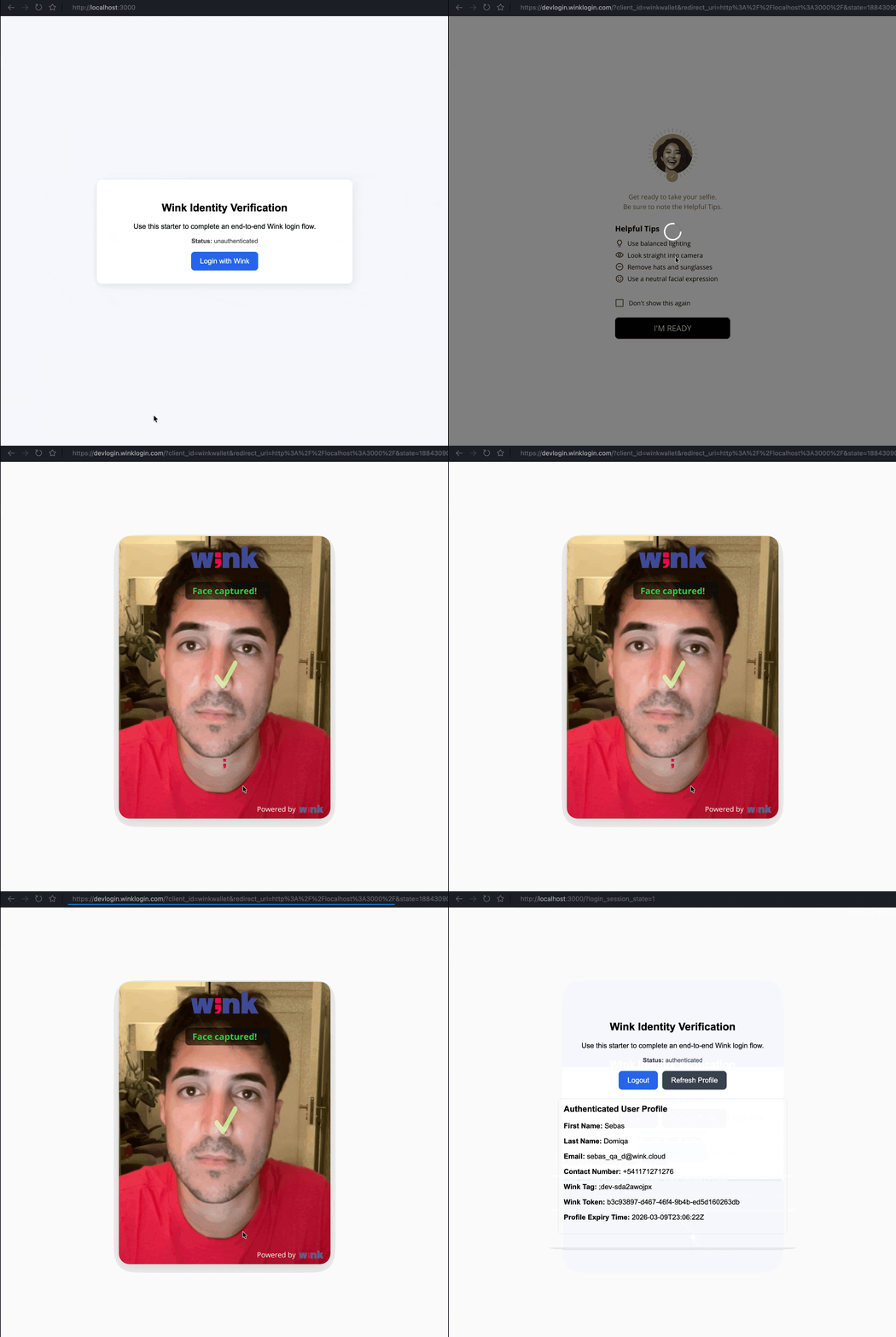
pnpm dev(ornpm run dev). - Open the app, click Login with Wink, and complete the flow.
No
clientSecretor other credentials are used in the frontend; session creation and user data are done via your backend
Option B: Add Wink to an existing React app
If you prefer to integrate into an existing app instead of using the starter:
Prerequisites
- React 16.8+ (Hooks)
- Node.js 18+
- A backend API that creates the Wink session and returns user profile (see Backend Integration).
1. Install the SDK
npm install wink-identity-sdk
# or
pnpm add wink-identity-sdk
2. Environment variables (client-safe only)
Use a .env or .env.local file. With Vite, variable names must start with VITE_. Never put clientSecret or any secret here.
VITE_WINK_CLIENT_ID=your-client-id
VITE_WINK_REALM=your-realm
VITE_WINK_BASE_URL=https://login-api.winkapis.com
VITE_WINK_AUTH_URL=https://auth.winkapis.com
VITE_WINK_BACKEND_URL=http://localhost:8080
Your backend uses credentials and calls the Wink Session API; the frontend only calls your backend (e.g. GET /session, GET /user).
3. Backend contract
Your backend must expose:
- GET /session?returnUrl=...&cancelUrl=... — Creates a Wink session server-side and returns JSON that includes a session id (e.g.
sessionId,SessionId, orid). - GET /user?clientId=...&token=... — Returns the user profile after authentication.
4. Integration flow
- On app load: Create a Wink client with
getWinkLoginClient(config)(no sessionId). Callclient.winkInit({ silentCheckSsoRedirectUri: '...', onSuccess, onFailure })to check for an existing session (SSO). - On login: Call your backend
GET /session?returnUrl=...&cancelUrl=..., read the session id from the response, then create a new client with thatsessionIdin config:getWinkLoginClient({ ...config, sessionId }). Callclient.winkInit({ onLoad: 'login-required', checkLoginIframe: false, onFailure })to trigger the login redirect. - After auth: Fetch user profile from your backend (
GET /user) using the token from the client; do not rely on the client alone for profile. - Logout: Build the OIDC logout URL (auth server + realm + logout endpoint +
post_logout_redirect_uri+client_id+ optionalid_token_hint), then redirect the user. Clear local tokens/cookies as needed.
For a full reference implementation (config shape, error handling, protected routes), use the React Starter Kit as the source of truth.
5. Session ID is mandatory
You must obtain a sessionId from your backend before starting the login flow and pass it in the client config when creating the Wink client (so the SDK can add it to the authorization URL). Never call the Wink Session API from the browser.
Security: Your backend calls the Wink Session API with credentials. See Backend Integration and Session Management for details.
6. Token lifetimes (reference)
- Access Token: 5 minutes
- Refresh Token: 30 minutes (each refresh extends all tokens by 5 minutes)
- See Login and Logout Behavior for full token lifecycle.
Flow overview
User clicks "Login with Wink"
    ↓
App calls backend GET /session?returnUrl=...&cancelUrl=...
    ↓
Backend calls Wink Session API (server-side), returns sessionId
    ↓
App creates Wink client with sessionId in config → getWinkLoginClient(config)
    ↓
App calls client.winkInit({ onLoad: "login-required", ... })
    ↓
User is redirected to Wink Identity → authenticates (e.g. biometric)
    ↓
Wink redirects back to your app (callback URL)
    ↓
SDK processes callback; onSuccess, app fetches user from backend GET /user
    ↓
User is authenticated; use winkLogout() and OIDC logout URL for sign out
Key points
- Starter Kit first — Use the React Starter Kit for a complete, secure example.
- Session from backend — Always get
sessionIdfrom your backend; pass it in the client config when starting login. - No secrets in the frontend — No
clientSecret; no direct Wink Session API calls from the browser. - User profile from backend — After auth, get profile via your backend (
GET /user). - Logout — Use the SDK's logout behavior and the OIDC logout URL (e.g. with
id_token_hint).
Troubleshooting
| Issue | What to check |
|---|---|
| Session creation fails | Backend GET /session returns 200 and a body with a session id; returnUrl and cancelUrl are valid. Backend has correct Wink credentials. |
| Login redirect doesn't start | sessionId is in the config when creating the client for the login flow. |
| User profile empty | Backend GET /user is called with clientId and token after onSuccess; backend is configured and returns the expected shape. |
| Token refresh / expiry | Access 5 min, refresh 30 min; implement refresh via your backend or token endpoint if you need longer sessions. See Login and Logout Behavior. |
Additional resources
Updated 24 days ago