
Next JS
End-to-end guide for integrating Wink Identity Web into Next.js 13+ apps, covering both the recommended SDK-based Starter Kit (with internal API routes, profile UI, and OIDC logout) and an alternative NextAuth.js + Keycloak flow. Includes environment setup, secure session creation, user profile retrieval, logout behavior, troubleshooting, and suggestions for screenshots and demo videos.
If you're integrating Wink Login into a Next.js app, you can choose between two approaches:
- Option A (recommended): Use the Wink Identity Web SDK with the official Next.js Starter Kit
- Option B (alternative): Use NextAuth.js with the Keycloak provider (no SDK)
Both options follow the same security model: session-first flow, server-side secrets, and redirect back to your app after biometric authentication.
CRITICAL SECURITY WARNING – READ FIRST
NEVER expose sensitive data in client-side code. This includes:
- ❌
clientSecret– MUST be server-side only (noNEXT_PUBLIC_prefix)- ❌ API keys and credentials – MUST be server-side only
- ❌ Direct API calls to Wink Session / Verify APIs from the browser – MUST go through backend API routes
All sensitive operations (session creation, API calls with credentials) MUST be performed server-side through Next.js API routes.
Option A: Use the Next.js Starter Kit (recommended)
The fastest way to integrate Wink Identity into a Next.js app is to start from the official SDK-based starter. It already implements:
- Session creation via internal Next.js API routes
- SDK-based login with
sessionId - User profile retrieval via backend-only verify API
- Standards-based OIDC logout
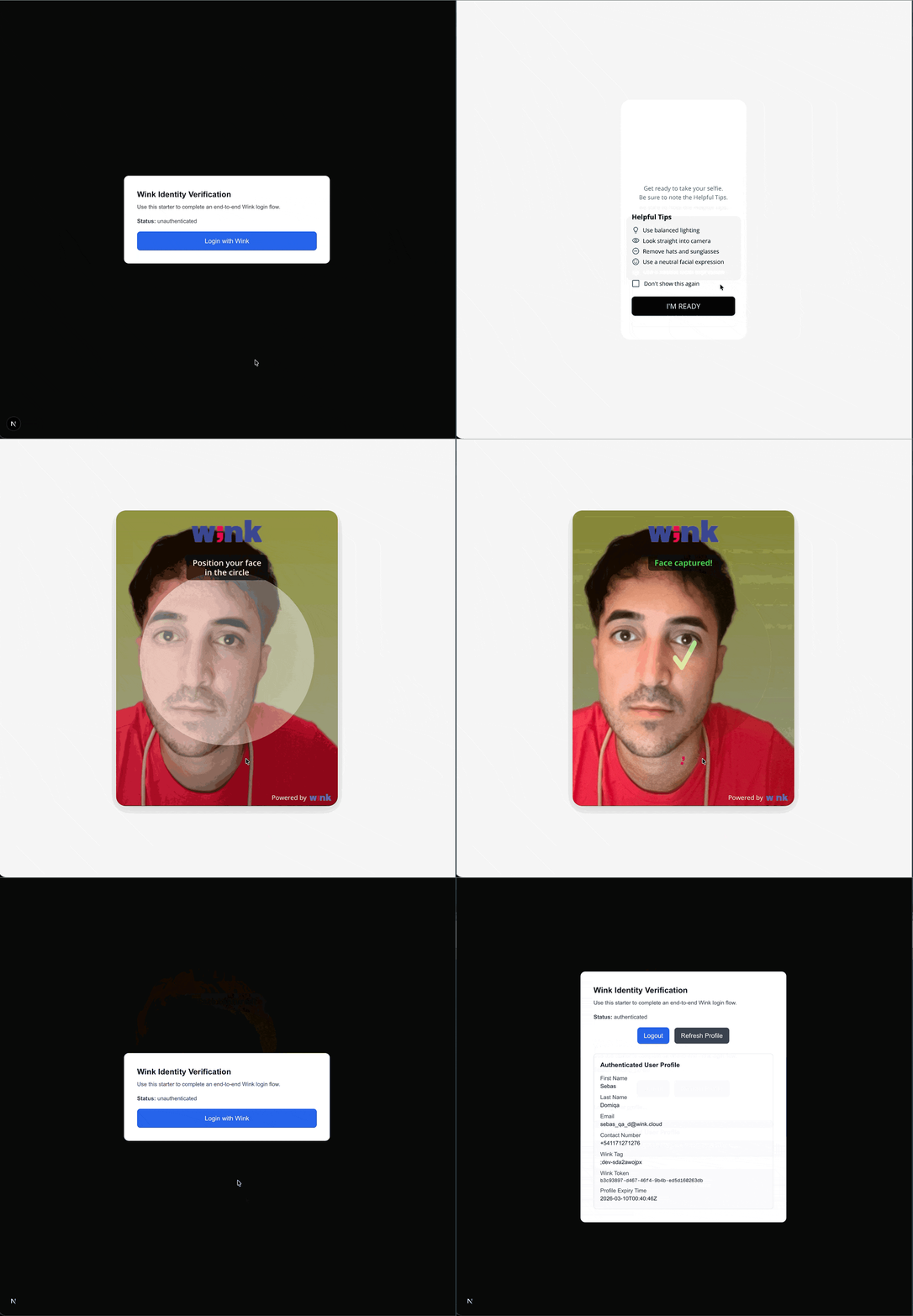
- A minimal UI that mirrors the React Starter Kit
1. Repository and stack
- Repository:
https://github.com/wink-cloud/wink-identity-web-next-js-starter-kit - Stack:
- Next.js 13+ (App Router)
- TypeScript
wink-identity-sdk- Next.js API Routes (
/app/api/...)
- Includes:
WinkAuthProvideranduseWinkAuth()hookGET /api/wink/sessionandGET /api/wink/user(internal backend)- Auth state model:
authenticated,unauthenticated,logging_in,logging_out,loading_profile,error
- Profile UI with Wink-specific fields
- OIDC logout flow via end-session URL
2. Quick start
git clone https://github.com/wink-cloud/wink-identity-web-next-js-starter-kit.git
cd wink-identity-web-next-js-starter-kit
npm install
cp .env.example .env.local
# Edit .env.local with your Wink credentials
npm run dev
The app will run on:
http://localhost:30003. Environment variables
Create .env.local:
# Client-safe (can be exposed to the browser)
NEXT_PUBLIC_WINK_CLIENT_ID=__client_id__
NEXT_PUBLIC_WINK_REALM=__realm__
NEXT_PUBLIC_WINK_BASE_URL=https://stagelogin-api.winkapis.com
NEXT_PUBLIC_WINK_AUTH_URL=https://stageauth.winkapis.com

# Server-only (NEVER use NEXT_PUBLIC_ here)
WINK_IDENTITY_BASE_URL=https://stagelogin-api.winkapis.com
WINK_IDENTITY_CLIENT_ID=__client_id__
WINK_IDENTITY_SECRET=__client_secret__NEXT_PUBLIC_*variables are read by the SDK in the browser.WINK_IDENTITY_*variables are used only by Next.js API routes.
4. Internal API routes
The starter exposes two internal routes under /api/wink:
GET /api/wink/session
GET /api/wink/session- Inputs (query params):
returnUrlcancelUrl
- Behavior:
- Builds
Authorization: Basic {base64(clientId:secret)}usingWINK_IDENTITY_CLIENT_IDandWINK_IDENTITY_SECRET - Calls:
POST {WINK_IDENTITY_BASE_URL}/wink/v1/session - Returns the Wink session payload (includes
sessionIdor equivalent key)
- Builds
GET /api/wink/user
GET /api/wink/user- Inputs (query params):
clientIdtoken(access token or ID token from the SDK)
- Behavior:
- Calls:
POST {WINK_IDENTITY_BASE_URL}/api/ConfidentialClient/verify-client - Body:
{ ClientId, AccessToken, ClientSecret } - Returns the user profile JSON
- Calls:
flowchart LR
  subgraph browser["Browser_NextJS_App"]
    browserUi["Next.js UI\n(Login button, profile panel)"]
  end

  subgraph api["NextJS_API_Routes"]
    sessionRoute["/api/wink/session\n(creates Wink session)"]
    userRoute["/api/wink/user\n(fetches user profile)"]
  end

  subgraph winkApis["Wink_APIs"]
    winkSession["POST /wink/v1/session\n(Session API)"]
    winkVerify["POST /api/ConfidentialClient/verify-client\n(Verify Client API)"]
  end

  %% Session creation flow
  browserUi -->|"GET /api/wink/session?returnUrl=...&cancelUrl=..."| sessionRoute
  sessionRoute -->|"POST {WINK_IDENTITY_BASE_URL}/wink/v1/session\nBasic Auth: clientId:secret"| winkSession
  winkSession -->|"JSON { sessionId, ... }"| sessionRoute
  sessionRoute -->|"JSON { sessionId, ... }"| browserUi

  %% Profile fetch flow
  browserUi -->|"GET /api/wink/user?clientId=...&token=..."| userRoute
  userRoute -->|"POST {WINK_IDENTITY_BASE_URL}/api/ConfidentialClient/verify-client\nClientId + AccessToken + ClientSecret"| winkVerify
  winkVerify -->|"JSON user profile"| userRoute
  userRoute -->|"JSON user profile"| browserUi
5. Auth flow with WinkAuthProvider
At a high level:
-
Initialization (
winkInit)- Builds SDK config via
getWinkConfig()(no secret, optional overrides for BASE_URL/AUTH_URL). - Calls
winkInit({ silentCheckSsoRedirectUri }). - If Wink SSO is already active:
onSuccesstriggers profile load via/api/wink/user.
- If not, the state remains
unauthenticated.
- Builds SDK config via
-
Login (
Login with Winkbutton)- Fetches a session from the internal API:
GET /api/wink/session?returnUrl=...&cancelUrl=...
- Extracts
sessionId(supportssessionId,SessionId,id,session_id). - Creates a new Wink client with
sessionIdinside the config. - Calls
winkInit({ onLoad: "login-required" })to start the OAuth/OIDC flow.
- Fetches a session from the internal API:
-
Callback and profile
- After Wink finishes, the SDK calls
onSuccesswith tokens accessible on the client instance. WinkAuthProviderthen:- Checks whether there was a manual logout marker.
- Calls
/api/wink/userto fetch the profile withclientId+ token. - Updates
authState,userProfile, andisAuthenticated.
- After Wink finishes, the SDK calls
-
Logout (OIDC + local cleanup)
- Marks manual logout in
sessionStorage. - Clears cookies and storage entries related to session/token.
- Builds OIDC logout URL:
${AUTH_URL}/realms/${REALM}/protocol/openid-connect/logout?...
- Redirects the browser to guarantee logout from the IdP.
- Marks manual logout in
6. UI and testing
The starter renders:
- Status line: current
authState - Login with Wink button (disabled while busy)
- Logout and Refresh Profile buttons once authenticated
- Profile card with:
firstName,lastName,email,contactNo,winkTag,winkToken,expiryTime
- Error messages with step-aware details (e.g.
LOGIN,PROFILE_FETCH,LOGOUT_CONFIG)
Testing checklist:
- Start the app with
npm run dev. - Click Login with Wink and complete the biometric flow.
- Verify:
- Status is
authenticated. - The profile card shows fields populated from the verify API.
- Status is
- Click Refresh Profile to fetch the profile again.
- Click Logout and confirm:
- Local UI resets to
unauthenticated. - Browser is redirected through the OIDC end-session endpoint.
- Local UI resets to
Option B: Use NextAuth.js (no SDK)
If your team prefers to centralize auth with NextAuth, you can integrate Wink Login using the Keycloak provider. In this setup:
- NextAuth acts as the OAuth client.
- You do not use the Wink Identity Web SDK.
- The Wink session is still created server-side via an API route before redirecting the user to Keycloak/Wink.
Note: This approach does NOT require the Wink Identity Web SDK. NextAuth handles OAuth flows, token management, and session handling.
Prerequisites
- Next.js 13+ (App Router)
- Node.js 18+
- Backend API route for session creation (see Backend Integration)
Quick Start
Starter Kit Variant: If you ship a NextAuth-based variant, link it here as an alternative. Otherwise, treat these steps as a manual recipe.
Installation
npm install next-auth@^4.24.11 axios
# or
yarn add next-auth@^4.24.11 axios
# or
pnpm add next-auth@^4.24.11 axios
Environment Variables
# Wink Identity Configuration (Client-safe – can be exposed to browser)
NEXT_PUBLIC_WINK_LOGIN_AUTH_URL=https://auth.winklogin.com/
NEXT_PUBLIC_WINK_LOGIN_CLIENT_ID=your-client-id
NEXT_PUBLIC_WINK_LOGIN_REALM=your-realm

# Server-side only (NEVER exposed to browser – used in API routes)
WINK_SESSION_API_URL=https://api.winklogin.com/wink/v1/session
KEYCLOAK_CLIENT_ID=your-client-id
KEYCLOAK_CLIENT_SECRET=your-client-secret
NEXTAUTH_SECRET=your-nextauth-secret-here
NEXTAUTH_URL=http://localhost:3000
1: Create Session API Route
Create a Next.js API route that calls the Wink Session API. This route handles all sensitive operations server-side:
// app/api/wink/session/route.ts
import axios from 'axios';
import { NextRequest } from 'next/server';

export async function POST(req: NextRequest) {
  try {
    const { returnUrl, cancelUrl } = (await req.json()) as {
      returnUrl?: string;
      cancelUrl?: string;
    };

    if (!returnUrl || !cancelUrl) {
      return new Response(
        JSON.stringify({ error: 'Missing returnUrl or cancelUrl' }),
        { status: 400 }
      );
    }

    // ✅ These environment variables are server-side only (no NEXT_PUBLIC_ prefix)
    // They are NEVER exposed to the browser
    const baseUrl = process.env.WINK_SESSION_API_URL;
    const clientId = process.env.KEYCLOAK_CLIENT_ID;
    const clientSecret = process.env.KEYCLOAK_CLIENT_SECRET;

    if (!baseUrl || !clientId || !clientSecret) {
      return new Response(
        JSON.stringify({ error: 'Session service is not configured' }),
        { status: 500 }
      );
    }

    // Create Basic Auth credentials
    const credentials = Buffer.from(`${clientId}:${clientSecret}`).toString('base64');

    const response = await axios.post(
      baseUrl,
      { returnUrl, cancelUrl },
      {
        headers: {
          'Content-Type': 'application/json',
          Authorization: `Basic ${credentials}`,
        },
      }
    );

    return Response.json(response.data);
  } catch {
    // Do not leak internals; return generic error
    return new Response(JSON.stringify({ error: 'Failed to create session' }), {
      status: 500,
    });
  }
}
See: Backend Integration for details on the Wink Session API endpoint.
2: Create Session Service
Create a service to handle session creation:
// services/winkSessionService.ts
import axios from 'axios';

export interface WinkSessionResponse {
  sessionId: string;
}

export class WinkSessionService {
  private static instance: WinkSessionService;
  private baseUrl: string;
  private clientId: string;

  private constructor() {
    this.baseUrl = '/api/wink/session';
    this.clientId = process.env.NEXT_PUBLIC_WINK_LOGIN_CLIENT_ID || '';
  }

  public static getInstance(): WinkSessionService {
    if (!WinkSessionService.instance) {
      WinkSessionService.instance = new WinkSessionService();
    }
    return WinkSessionService.instance;
  }

  public async createSession(
    returnUrl: string,
    cancelUrl: string
  ): Promise<WinkSessionResponse> {
    if (!this.baseUrl || !this.clientId) {
      throw new Error('Wink session configuration is incomplete');
    }

    try {
      const response = await axios.post<WinkSessionResponse>(
        '/api/wink/session',
        { returnUrl, cancelUrl }
      );
      return response.data;
    } catch (error) {
      if (axios.isAxiosError(error)) {
        const errorMessage = error.response?.data?.message || error.message;
        throw new Error(`Failed to create Wink session: ${errorMessage}`);
      }
      throw new Error('Failed to create Wink session: Unknown error');
    }
  }

  public isConfigured(): boolean {
    return !!(this.clientId);
  }
}

export const winkSessionService = WinkSessionService.getInstance();
3: Create Type Definitions
// types/auth.ts
import { Session } from 'next-auth';

export interface IToken {
  accessToken?: string;
  idToken?: string;
  refreshToken?: string;
  accessTokenExpires?: number;
  user?: any;
  error?: string;
}

export type ExtendedSession = Session & Partial<IToken>;
4: Create Configuration File
// config/index.ts
type Configuration = {
  winkLoginAuthURL: string | undefined;
  winkLoginClientId: string | undefined;
  winkLoginRealm: string | undefined;
};

export const configuration: Configuration = {
  winkLoginAuthURL: process.env.NEXT_PUBLIC_WINK_LOGIN_AUTH_URL,
  winkLoginClientId: process.env.NEXT_PUBLIC_WINK_LOGIN_CLIENT_ID,
  winkLoginRealm: process.env.NEXT_PUBLIC_WINK_LOGIN_REALM,
};
5: Configure NextAuth with Keycloak Provider
Set up NextAuth with the Keycloak provider, including token refresh logic:
// app/api/auth/[...nextauth]/route.ts
import NextAuth, { AuthOptions } from 'next-auth';
import type { JWT } from 'next-auth/jwt';
import type { Account, Session } from 'next-auth';
import KeycloakProvider from 'next-auth/providers/keycloak';
import axios from 'axios';
import { configuration } from '@/config';
import { ExtendedSession } from '@/types/auth';
import { IToken } from '@/types/auth';

async function refreshAccessToken(token: IToken): Promise<IToken> {
  try {
    const url = `${configuration.winkLoginAuthURL!}realms/${configuration.winkLoginRealm!}/protocol/openid-connect/token`;
    const params = new URLSearchParams({
      client_id: process.env.KEYCLOAK_CLIENT_ID || '',
      grant_type: 'refresh_token',
      refresh_token: token.refreshToken || '',
    });

    const response = await axios.post(url, params.toString(), {
      headers: { 'Content-Type': 'application/x-www-form-urlencoded' },
    });

    const refreshedTokens = response.data;
    return {
      ...token,
      accessToken: refreshedTokens.access_token,
      refreshToken: refreshedTokens.refresh_token,
      accessTokenExpires: Date.now() + Number(refreshedTokens.expires_in) * 1000,
    };
  } catch (error) {
    console.error('Error refreshing access token:', error);
    return { ...token, error: 'RefreshAccessTokenError' };
  }
}

type AuthOptionsWithTrust = AuthOptions & { trustHost?: boolean };

const authOptionsWithTrust: AuthOptionsWithTrust = {
  secret: process.env.NEXTAUTH_SECRET || '',
  useSecureCookies: process.env.NODE_ENV === 'production',
  trustHost: true,
  providers: [
    KeycloakProvider({
      clientId: process.env.KEYCLOAK_CLIENT_ID || '',
      clientSecret: process.env.KEYCLOAK_CLIENT_SECRET || '',
      issuer: `${configuration.winkLoginAuthURL!}realms/${configuration.winkLoginRealm!}`,
      checks: [],
      idToken: true,
      // @ts-expect-error: skipTokenValidation is not officially documented but required for Wink
      skipTokenValidation: true,
      authorization: {
        params: {
          scope: 'openid profile email',
          response_type: 'code',
        },
      },
    }),
  ],
  session: {
    strategy: 'jwt' as const,
  },
  callbacks: {
    async jwt({
      token,
      account,
    }: {
      token: JWT;
      account: Account | null;
    }): Promise<JWT> {
      if (account) {
        token.accessToken = account.access_token;
        if (account.id_token) token.idToken = account.id_token;
        if (account.refresh_token && account.expires_at) {
          token.refreshToken = account.refresh_token;
          token.accessTokenExpires = Number(account.expires_at) * 1000;
        }
        return token;
      }

      if (
        typeof token.accessTokenExpires === 'number' &&
        Date.now() < token.accessTokenExpires
      ) {
        return token;
      }

      const refreshed = await refreshAccessToken(token as IToken);
      return refreshed as JWT;
    },
    async session({
      session,
      token,
    }: {
      session: Session;
      token: JWT;
    }): Promise<Session> {
      const extSession: ExtendedSession = {
        ...session,
        accessToken: token.accessToken,
        idToken: token.idToken,
        error: typeof token.error === 'string' ? token.error : undefined,
      };
      return extSession;
    },
  },
  pages: {
    signIn: '/signin',
  },
};

const handler = NextAuth(authOptionsWithTrust as AuthOptions);
export { handler as GET, handler as POST };
6: Create Authentication Service
// services/authService.ts
import { signIn, signOut } from 'next-auth/react';
import { configuration } from '@/config';
import { winkSessionService } from './winkSessionService';
import type { Session } from 'next-auth';
import type { ExtendedSession } from '@/types/auth';

export const authService = {
  login: async () => {
    try {
      if (!winkSessionService.isConfigured()) {
        console.warn(
          'Wink session service not configured, proceeding with standard login'
        );
        return await signIn('keycloak');
      }

      const returnUrl = `${window.location.origin}/api/auth/callback/keycloak`;
      const cancelUrl = `${window.location.origin}/signin?error=access_denied`;

      const sessionResponse = await winkSessionService.createSession(
        returnUrl,
        cancelUrl
      );

      const keycloakBaseUrl = `${configuration.winkLoginAuthURL}realms/${configuration.winkLoginRealm}/protocol/openid-connect/auth`;
      const params = new URLSearchParams({
        client_id: configuration.winkLoginClientId || '',
        redirect_uri: returnUrl,
        response_type: 'code',
        scope: 'openid profile email',
        sessionId: sessionResponse.sessionId,
      });

      window.location.href = `${keycloakBaseUrl}?${params.toString()}`;

      return new Promise(() => {});
    } catch (error) {
      console.error('Failed to create Wink session:', error);
      return await signIn('keycloak');
    }
  },

  logout: async (session: Session | null): Promise<void> => {
    await signOut({ redirect: false });
    const extendedSession = session as ExtendedSession | null;
    if (extendedSession?.idToken) {
      const keycloakIssuer = `${configuration.winkLoginAuthURL}realms/${configuration.winkLoginRealm}`;
      const postLogoutRedirectUri = window.location.origin;
      const logoutURL = `${keycloakIssuer}/protocol/openid-connect/logout?id_token_hint=${extendedSession.idToken}&post_logout_redirect_uri=${postLogoutRedirectUri}`;
      window.location.href = logoutURL;
    } else {
      window.location.href = '/';
    }
  },
};
7: Create Login Component
// components/auth/SignInForm.tsx
'use client';
import React, { useState } from 'react';
import { authService } from '@/services/authService';

export default function SignInForm() {
  const [loading, setLoading] = useState(false);

  const handleSignIn = async (e: React.MouseEvent<HTMLButtonElement>) => {
    e.preventDefault();
    setLoading(true);
    try {
      await authService.login();
    } catch (error) {
      console.error('Login error:', error);
      setLoading(false);
    }
  };

  return (
    <div className="flex flex-col items-center justify-center min-h-screen">
      <div className="w-full max-w-md p-8">
        <h1 className="text-2xl font-bold mb-4">Sign In</h1>
        <button
          onClick={handleSignIn}
          disabled={loading}
          className="w-full px-4 py-2 bg-blue-600 text-white rounded hover:bg-blue-700 disabled:opacity-50"
        >
          {loading ? 'Signing in...' : 'Sign in with Wink'}
        </button>
      </div>
    </div>
  );
}
8: Create Sign-In Page
// app/signin/page.tsx
import SignInForm from '@/components/auth/SignInForm';

export default function SignIn() {
  return <SignInForm />;
}
9: Wrap App with SessionProvider
// app/SessionProviderWrapper.tsx
'use client';

import { SessionProvider } from 'next-auth/react';
import React, { ReactNode } from 'react';

interface SessionProviderWrapperProps {
  children: ReactNode;
}

export function SessionProviderWrapper({
  children,
}: SessionProviderWrapperProps) {
  return <SessionProvider>{children}</SessionProvider>;
}
Update root layout:
// app/layout.tsx
import { SessionProviderWrapper } from '@/app/SessionProviderWrapper';

export default function RootLayout({
  children,
}: {
  children: React.ReactNode;
}) {
  return (
    <html lang="en">
      <body>
        <SessionProviderWrapper>
          {children}
        </SessionProviderWrapper>
      </body>
    </html>
  );
}
10: Use Session in Components
// components/UserProfile.tsx
'use client';
import { useSession } from 'next-auth/react';
import { authService } from '@/services/authService';
import type { ExtendedSession } from '@/types/auth';

export default function UserProfile() {
  const { data: session, status } = useSession();
  const extendedSession = session as ExtendedSession | null;

  if (status === 'loading') {
    return <div>Loading...</div>;
  }

  if (status === 'unauthenticated') {
    return <div>Please sign in</div>;
  }

  return (
    <div>
      <h2>Welcome, {session?.user?.name || session?.user?.email}</h2>
      <p>Access Token: {extendedSession?.accessToken ? '✓' : '✗'}</p>
      <button onClick={() => authService.logout(session)}>
        Sign Out
      </button>
    </div>
  );
}
11: Protect Routes with Middleware (Optional)
// middleware.ts
import { withAuth } from 'next-auth/middleware';
import { NextResponse } from 'next/server';

export default withAuth(
  function middleware(req) {
    return NextResponse.next();
  },
  {
    callbacks: {
      authorized: ({ token }) => !!token,
    },
  }
);

export const config = {
  matcher: ['/dashboard/:path*', '/profile/:path*'],
};
Complete Flow Diagram (NextAuth)
User clicks "Sign in with Wink"
    ↓
authService.login() is called
    ↓
Create Wink Session (POST to /api/wink/session → Wink Session API)
    ↓
Receive sessionId from Wink backend
    ↓
Construct Keycloak authorization URL with sessionId query param
    ↓
Redirect user to Keycloak authorization endpoint
    ↓
User authenticates with Wink Identity (biometric verification)
    ↓
Keycloak redirects to /api/auth/callback/keycloak with authorization code
    ↓
NextAuth processes callback, exchanges code for tokens
    ↓
NextAuth creates session and redirects to your app
    ↓
User is authenticated and session is available via useSession()
Key Points
- Session ID is mandatory: Always generate a Wink session before initiating the OAuth flow.
- Query parameter: Pass
sessionIdas a query parameter in the authorization URL (NextAuth option) or via config (SDK option). - Security: Use Basic Authentication (client ID + secret) when calling the Wink Session API from the backend.
- SDK vs NextAuth:
- SDK starter (Option A) is the recommended, npm-first path.
- NextAuth (Option B) is an alternative for teams standardizing on NextAuth.
- Token refresh (NextAuth option): Implemented via the
jwtcallback and therefreshAccessTokenhelper.
Troubleshooting
Session creation fails
- Verify
WINK_IDENTITY_BASE_URL/WINK_SESSION_API_URLis correct. - Check that
KEYCLOAK_CLIENT_SECRET/WINK_IDENTITY_SECRETis set correctly. - Ensure the client ID and secret match your Wink Identity configuration.
Redirect loop
- Verify
NEXTAUTH_URL(NextAuth option) matches your application URL. - Check that callback URLs are correctly configured in Wink / Keycloak.
- Ensure the
returnUrlin session creation matches your NextAuth callback URL.
Token refresh errors (NextAuth option)
- Verify
KEYCLOAK_CLIENT_IDandKEYCLOAK_CLIENT_SECRETare correct. - Check that the refresh token is being stored correctly.
- Ensure the token endpoint URL is correct.
Why a Session ID?
The sessionId allows Wink Identity to:
- Track authentication requests end-to-end
- Link the biometric step, the OAuth redirection, and the final callback
- Provide additional security against tampering and replay attacks
- Guarantee consistency across browser/device transitions
Required inputs when creating a session:
returnUrl— where to redirect the user after successful logincancelUrl— where to redirect the user if login is canceled
Required output from Wink:
{
  "sessionId": "xxxx-xxxx-xxxx"
}
This value must be included either:
- As a query parameter in the OAuth2 authorization URL (NextAuth option), or
- In the SDK configuration when calling
winkInitwithonLoad: "login-required"(SDK option).
This value must be included as a query parameter in the OAuth2 authorization URL:
...?sessionId=<value>Updated 22 days ago